Unreal Engine X - Features

Two larger, experimental features have their own pages: Visibility Buffer and Spectral Rendering.
Renderer Configuration and Feature Availability
The primary renderer remains Win64 / D3D12 / SM6 / deferred. Source availability, project support and the selected rendering preset are separate decisions.
| System | Current behavior |
|---|---|
| Nanite | Uses normal ShouldRenderNanite() eligibility checks; newer changes do not automatically enable it for every project |
| Forward Shading | Full project-wide Forward Shading remains outside this renderer branch's supported configuration |
| Lumen | The previous unconditional-gate description is obsolete; the project preset below still disables Lumen |
RHI / RDG
This section groups Unreal Engine X changes to Direct3D 12, bindless resource handling, and the Render Dependency Graph.
D3D12 / Bindless Changes
| Change | File / Area | Description | CVar |
|---|---|---|---|
| Sampler cache hash | D3D12State.cpp | Hashes the complete zero-initialized D3D12_SAMPLER_DESC instead of only the filter value | x.D3D12.SamplerCache.FullDescriptorHash=1 |
| Bindless resource heap reserve | D3D12BindlessDescriptors.cpp | Makes the spare GPU resource heap count configurable | D3D12.Bindless.ResourceHeapSpareCount=4 |
| Descriptor-copy statistics | D3D12BindlessDescriptors.cpp | Counts copied descriptors after the existing sort/unique processing | D3D12.Bindless.HeapUpdateUniqueUploadThreshold=1024 |
| ResourceCollection residency | D3D12ResourceCollection.cpp | Rebuilds cached SRV and texture-reference residency lists after collection updates and updates linked GPU objects | x.D3D12.Bindless.ResidencyCacheHashThreshold=-1 |
| Dirty bindless stage mask | D3D12StateCache.* | Processes only shader stages that actually queued bindless residency work | x.D3D12.Bindless.UseDirtyStageMask=1 |
| Adjacent residency deduplication | D3D12StateCachePrivate.h | Skips consecutive duplicate SRV/UAV residency entries | x.D3D12.Bindless.SkipAdjacentResidencyDuplicates=1 |
| Descriptor copy coalescing | D3D12Descriptors.cpp | Combines consecutive descriptor indices into larger CopyDescriptors ranges and uses inline scratch storage for small updates | x.D3D12.Bindless.CoalesceDescriptorCopies=1 |
| Heap broadcast deduplication | D3D12BindlessDescriptors.cpp | Deduplicates large dirty-index lists before broadcasting changes to additional bindless GPU heaps | x.D3D12.Bindless.DedupBeforeHeapBroadcast=1 |
D3D12 / SM6 Configuration
The project should target DirectX 12 and Shader Model 6:
[/Script/WindowsTargetPlatform.WindowsTargetSettings]
DefaultGraphicsRHI=DefaultGraphicsRHI_DX12
+D3D12TargetedShaderFormats=PCD3D_SM6
VulkanRHI Modernization
The Vulkan path is being modernized separately from D3D12 rather than being treated as a compatibility-only backend.
For Windows, the VulkanRHI is moving to a Vulkan 1.3 minimum API contract while preserving Unreal's existing architecture where a complete redesign is unnecessary.
Selected changes have also been backported from newer Unreal Engine VulkanRHI code.
Current Vulkan Direction
The current completed work establishes the API and extension-promotion foundation.
The next major VulkanRHI targets are:
- make Synchronization2 mandatory,
- make timeline semaphores mandatory,
- standardize queue submission around
vkQueueSubmit2, - finish dynamic-rendering local-read correctness,
- make dynamic rendering unconditional,
- remove legacy render-pass/framebuffer execution paths,
- continue reducing legacy descriptor paths,
- and eventually make resource relocation safe with bindless descriptors.
Full Bindless
Enable the full bindless configuration for the SM6 shader platform with:
D3D12 SM6
[ShaderPlatformConfig PCD3D_SM6]
BindlessConfiguration=All
Vulkan SM6
[ShaderPlatformConfig SF_VULKAN_SM6]
BindlessConfiguration=All
For editor testing, the equivalent command-line configuration can be used:
-d3d12 -sm6 -BindlessAll
-vulkan -sm6 -BindlessAll
A minimal starting configuration is:
[ConsoleVariables]
x.D3D12.SamplerCache.FullDescriptorHash=1
D3D12.Bindless.ResourceHeapSpareCount=4
The resource-heap spare count can be increased when a project demonstrates additional descriptor-heap pressure.
RDG Live Pass Cache
Unreal Engine X contains an optional lightweight cache for repeated RDG live-pass traversal.
x.RDG.LivePassCache
| Value | Behavior |
|---|---|
0 | Disabled |
1 | Enabled |
Enable it with:
[ConsoleVariables]
x.RDG.LivePassCache=1
When enabled, RDG builds a compact LivePassHandles array containing the graph prologue, non-culled passes, and graph epilogue. Repeated forward and reverse live-pass traversals can then iterate this compact list instead of scanning the complete pass range and testing every pass for culling again.
This is intentionally a mild optimization. It does not cache the complete Render Dependency Graph, resources, or pass execution state.
Rendering
Visibility Buffer
An optional hybrid rendering path for non-Nanite foliage. It records visible triangles, evaluates foliage materials in compute shaders and writes the GBuffer.
Async mode 2 now slightly outperforms legacy rendering in the latest recorded TROPICS benchmark. VRCS and compute shadows remain optional and were slower in that capture. Results depend on the scene and configuration.
See Visibility Buffer for the pipeline, settings, supported materials and measurements.
Flow Volumes
Experimental NVIDIA Flow 2 integration for fire, smoke, dust, steam, fog, gas and vortex effects.
Simulation can run on the primary GPU or an optional worker GPU; rendering remains on the primary GPU. Project-wide quality settings control simulation and rendering cost.
The integration does not yet generate persistent burned masks or scorch marks on affected objects.
See Flow Volumes for setup, controls, limitations and demo-map availability.
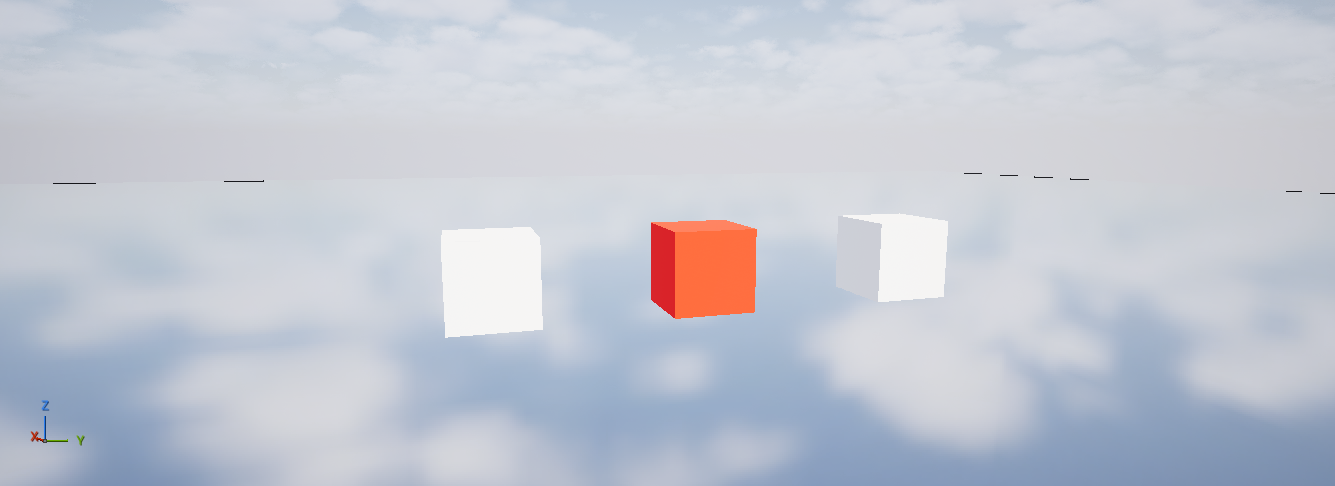
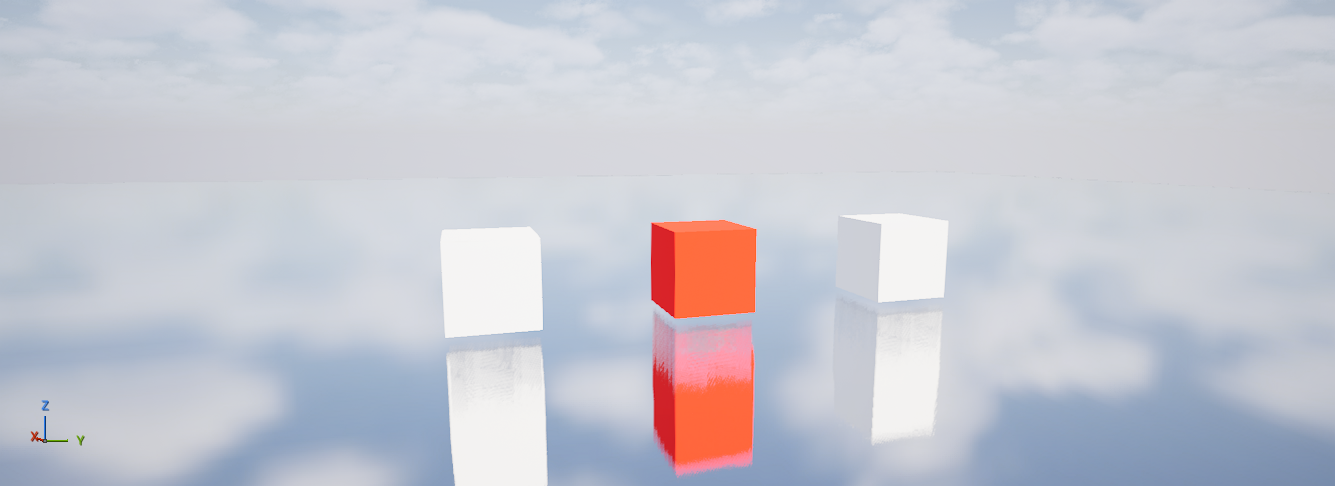
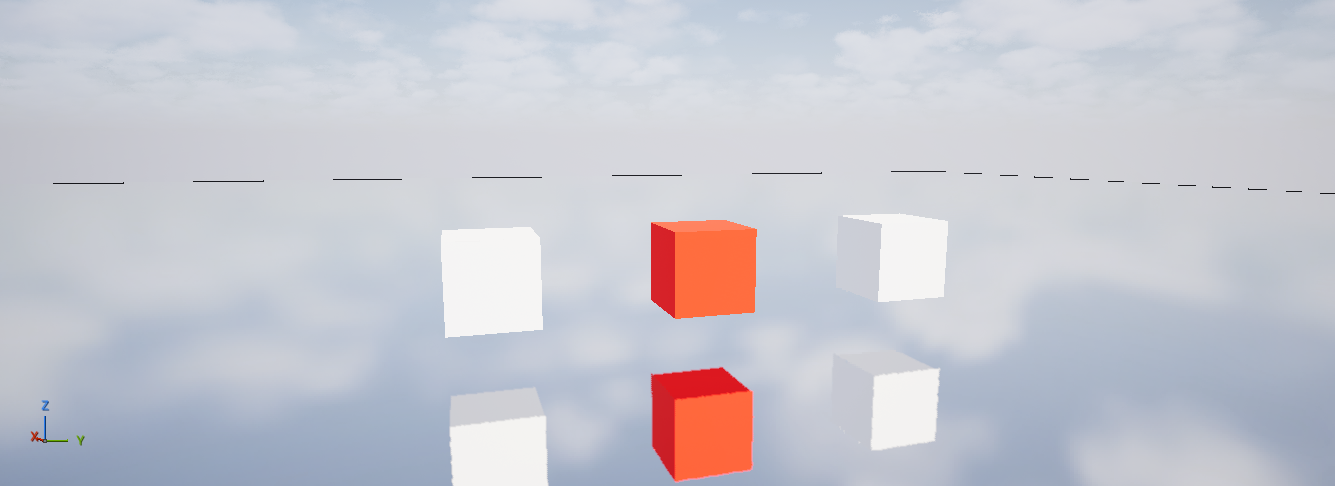
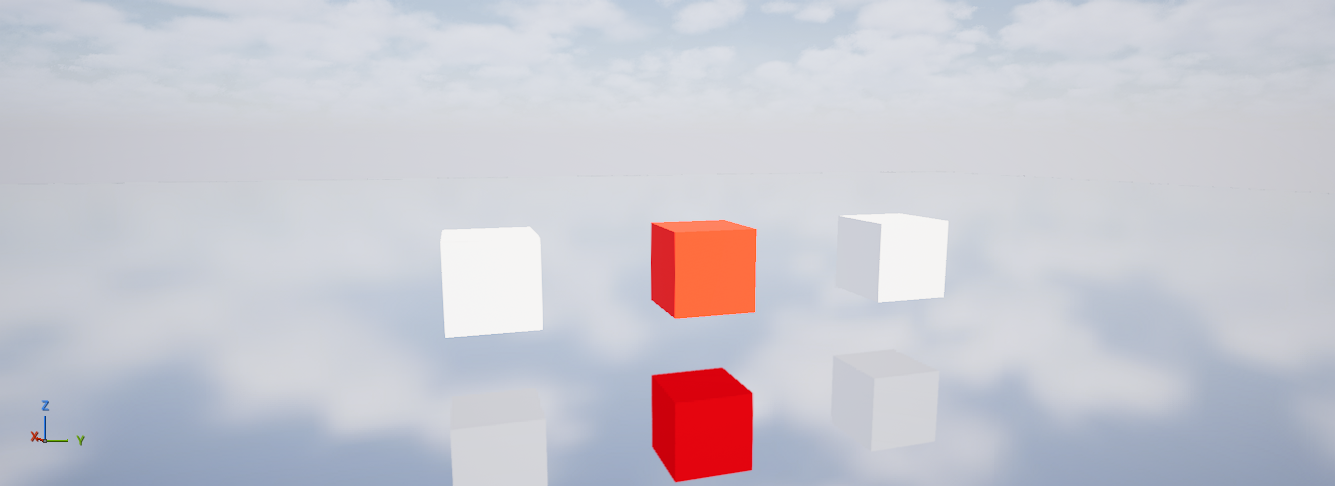
Legacy Ray-Traced Reflections
Unreal Engine X restores standalone hardware ray-traced reflections from the UE4-era feature family.
The direct implementation source is UE5.3, adapted to UE5.8's render graph and shader binding tables. The retained algorithm is brute force.
This is a separate reflection option from Lumen reflections. It requires hardware ray-tracing support, compatible project/shader settings and the full ray-tracing pipeline. The current implementation excludes Substrate.
For a project already configured for hardware ray tracing:
[ConsoleVariables]
r.ReflectionMethod=3
r.RayTracing.Reflections=-1
r.RayTracing.Reflections.SamplesPerPixel=1
r.RayTracing.Reflections.MaxBounces=1
r.RayTracing.Reflections.MaxRoughness=0.6
r.Reflections.Denoiser=1
r.RayTracing.Reflections=-1 follows the selected reflection method. 0 disables the standalone path; 1 requests it, subject to platform and view support.
Additional controls cover direct lighting, emissive/indirect contribution, reflected shadows, translucency and reflection captures.
Hardware-tessellation displacement is not represented in the traced geometry, so reflections can see the undisplaced surface.
Opacity Micromaps
Unreal Engine X includes the NVIDIA Opacity MicroMap integration for alpha-tested ray-traced geometry.
Opacity micromaps classify regions of a triangle by opacity, allowing supported hardware to resolve parts of the alpha test without repeatedly executing an any-hit shader. This is particularly relevant to masked geometry such as foliage cards.
The current integration uses the D3D12/NVAPI path and requires supported NVIDIA hardware, the plugin enabled at startup, hardware ray tracing and baked micromap data.
Setup
- Enable the NVIDIA Opacity MicroMap plugin.
- Enable its hardware-opacity-micromap support setting.
- Restart the editor.
- Use Build > Build Opacity MicroMaps to generate data for compatible assets.
The main support setting is:
[ConsoleVariables]
r.RayTracing.Geometry.OpacityMicromaps.Enable=1
This is startup support configuration, not a substitute for generating micromap data.
Runtime comparison
With the plugin initialized and baked data available:
r.RayTracing.Geometry.OpacityMicromaps.RecreateRaytracedMeshes forceDisableOpacityMicromaps
recreates static ray-traced meshes without OMM attachments.
r.RayTracing.Geometry.OpacityMicromaps.RecreateRaytracedMeshes
recreates them with eligible OMM attachments.
XDash exposes equivalent MicroOpacity (OMM) comparison controls. They require an active world and detected hardware support.
These commands recreate ray-tracing geometry; they do not bake missing micromaps. Performance depends on geometry, materials and ray workload.
Rendering Backports
Selected newer-branch changes cover Nanite and foliage, Virtual Shadow Maps, shadow caching and renderer/RHI correctness.
See Backports and Engine Fixes for the complete recorded inventory.
Anisotropic Materials and GBufferF
The recommended configuration disables anisotropic materials:
r.AnisotropicMaterials=0
In Unreal Engine X this has an additional resource implication: GBufferF is not allocated when anisotropic materials are unsupported.
SceneTextures only creates GBufferF when:
SupportsAnisotropicMaterials()
returns true.
Projects that do not use anisotropic materials can therefore avoid allocating this additional GBuffer target.
Hardware Tessellation
Unreal Engine X restores hull/domain shader tessellation, which UE5 removed. It is ported from the UE 4.21 NVIDIA GameWorks branch and drives UE5's material Displacement input on non-Nanite geometry.
- Direct3D 12, Shader Model 6 (
PCD3D_SM6). Other RHIs compile without hull/domain shaders. - Nanite disabled for the project (
r.Nanite.ProjectEnabled=0). - Opaque or masked materials on static meshes, instanced static meshes or landscape.
Material setup
The settings are in the material's Nanite category, shared with UE5's Nanite displacement. Material instances can override Displacement Scaling and Displacement Fade.
| Setting | Description |
|---|---|
| Enable Tessellation | Turns hardware tessellation on for the material |
| Displacement | Height in [0, 1]. The surface moves (saturate(D) - Center) * Magnitude world units along the normal, as with Nanite |
| Displacement Scaling | Magnitude (total range in world units) and Center (the height that stays in place) |
| Tessellation Mode | Flat subdivides the triangle; PN Triangles also rounds it with curved patches |
| Enable Crack Free Displacement | Welds displacement across hard edges and UV seams |
| Displacement Fade | Fades displacement out below a pixel size on screen; fully faded patches are not subdivided |
| Tessellation Multiplier node | Custom output node that scales subdivision per vertex (0 none, above 1 denser). Below 1 it also fades displacement. Drive it with distance or world position, not UVs |
Crack-free displacement and PN Triangles on meshes with hard edges or UV seams need Build Adjacency Buffer (Static Mesh Editor > LOD > Build Settings). It is off by default and costs 4x the index buffer. Landscape needs none.
Console variables
| Console variable | Default | Description |
|---|---|---|
x.HWTessellation | 1 | 0 disables subdivision; displacement is still applied at the original vertices |
x.HWTessellation.MaxFactor | 15 | Maximum tessellation factor per edge, 1-64 |
x.HWTessellation.PixelsPerEdge | 10 | Target on-screen edge length of generated triangles; lower is denser |
x.HWTessellation.Shadow.EdgeLength | 2 | Target world-space edge length (cm) in shadow passes |
x.HWTessellation.Wireframe | 0 | Draws tessellated meshes as wireframe in the base pass |
x.HWTessellation.DrawEvents | 0 | One GPU event per tessellated draw in ProfileGPU and Insights |
The developer menu has them under Unreal Engine X > Hardware Tessellation. stat HWTessellation shows tessellated draws and patch counts.
Coverage
- Tessellated: base pass, depth prepass, custom depth, velocity and every shadow type. Shadows subdivide by world edge length rather than by camera, so cached shadows stay valid.
- Landscape: components whose material tessellates opt out of landscape GPU culling.
- Skeletal meshes: intended follow-up support. The checked GPU-skin and passthrough vertex factories do not advertise
SupportsHWTessellation, so skeletal coverage is not yet enabled or validated. Adding a capability flag alone does not establish deformation, shader and adjacency correctness. - Other unsupported paths: spline meshes and particles.
- Not displaced: ray tracing, distance fields and Lumen see the undisplaced mesh.
Legacy Ray-Traced Reflections
Unreal Engine X restores standalone hardware ray-traced reflections from the UE4-era feature family.
The direct implementation source is UE5.3, adapted to UE5.8's render graph and shader binding tables. The retained algorithm is brute force.
This is a separate reflection option from Lumen reflections. It requires supported hardware ray tracing, the full ray-tracing pipeline and compatible project/shader configuration. Substrate is excluded by the current implementation.
For a project already configured for hardware ray tracing:
[ConsoleVariables]
r.ReflectionMethod=3
r.RayTracing.Reflections=-1
r.RayTracing.Reflections.SamplesPerPixel=1
r.RayTracing.Reflections.MaxBounces=1
r.RayTracing.Reflections.MaxRoughness=0.6
r.Reflections.Denoiser=1
r.RayTracing.Reflections=-1 follows the selected reflection method. 0 disables this standalone path; 1 requests it, subject to hardware/platform and view gates.
Increasing samples or bounces increases tracing cost.
The port includes controls for direct lighting, emissive/indirect contribution, reflected shadows, translucency and reflection captures. It does not restore every historical reflection algorithm.
Hardware tessellation displacement is not represented in traced geometry, so reflections can see the undisplaced surface.
The restored source currently includes untracked files and must be committed with its shader and renderer integration before it is available from a fresh checkout.
AMD FidelityFX Single Pass Downsampler (SPD)
Unreal Engine X integrates AMD FidelityFX Single Pass Downsampler (SPD) into Unreal Engine's post-processing texture downsample chain.
The standard low-quality downsample chain generates each lower-resolution stage as a separate dependent pass. SPD replaces the five-stage chain used by the current renderer path with a single compute dispatch when the compatible path is selected.
Enable SPD with:
[ConsoleVariables]
r.Downsample.EnableSPD=1
r.PostProcessing.DownsampleChainQuality=0
The current SPD integration is intentionally enabled only for Unreal Engine's Low downsample quality:
r.PostProcessing.DownsampleChainQuality=0
The existing High quality path is preserved because its repeated filtered downsample is not equivalent to SPD's reduction filter. Setting the chain quality to High therefore falls back to Unreal Engine's original sequential implementation rather than silently changing the image.
The shared downsample chain is used by several post-processing systems, so SPD is not limited to bloom. Depending on the active renderer configuration, it can reduce downsample work used by:
-
Gaussian Bloom,
-
Lens Flares,
-
Local Exposure blurred luminance,
-
and Basic Eye Adaptation.
For chains that do not require luminance data in alpha, the normal five dependent downsample stages become one SPD compute dispatch:
5 sequential downsample passes
->
1 SPD compute dispatch (5 generated levels)
Basic Eye Adaptation is handled differently because Unreal Engine writes scaled log luminance into the alpha channel after the first downsample and expects that value to propagate through the remaining levels. Its SPD path therefore preserves the engine's luminance setup:
Downsample
-> BasicEyeAdaptationSetup
-> SPD compute dispatch (4 remaining levels)
This avoids changing Unreal Engine's exposure calculation while still removing four dependent downsample passes.
Example GPU Capture
In a simple editor-resolution test scene, the scene downsample chain changed from:
Before: 5 passes / ~0.04 ms
SPD:    1 pass  / ~0.01 ms
That capture represents roughly a 75% reduction in GPU time for this specific downsample workload. It should not be treated as a fixed percentage for every GPU, resolution, or scene. The absolute cost of the downsample chain grows with resolution, so the value of eliminating dependent dispatches and synchronization generally becomes more relevant as the workload increases.
The current integration targets the existing five generated stages used by Unreal Engine's post-processing downsample chains. AMD SPD itself is designed as a general single-pass mip-generation technique and can support larger mip chains, but unrelated engine mip-generation systems are not automatically redirected through this path.
FidelityFX GPU Radix Sort
Unreal Engine X also includes an alternative Radix Sort backend for the FidelityFX GPU sorting path. The configuration keeps FidelityFX Parallel Sort selected while enabling the fork's radix backend, providing a specialized route for GPU workloads that sort large key/value buffers.
[ConsoleVariables]
fx.GPUSort.Algorithm=0
x.GPUSort.RadixBackend=1
The optimization is intended for GPU workloads where sorting cost becomes significant. Its benefit depends on the number of elements being sorted, the workload using GPU sort, and the target GPU, so performance should be validated with a representative capture rather than treated as a fixed improvement.
Cascaded Shadow Maps
Unreal Engine X keeps classic cascaded shadow maps (Virtual Shadow Maps are disabled) and improves them. Most settings are in the developer menu under Unreal Engine X > Cascaded Shadows.
| Change | Console variable | Description |
|---|---|---|
| CSM shadow-depth reuse (UE6 backport) | x.Shadow.CSMShadowDepthReuse=1, x.Shadow.CSMShadowDepthReuse.Interval=2 | Reuses unchanged cascade depth beyond cascade 0 when no dynamic casters are present |
| Static CSM caching | r.Shadow.CSMCaching=1 | Exposes the existing static cache to quality presets; dynamic casters still render every frame |
| Static caster LOD scale | x.Shadow.CSM.StaticCasterLODScale=0.5 | Coarser LODs for distant static casters per cascade (1, 1.5, 2, 2.5); animated casters and cascade 0 unchanged |
| Caster significance | x.Shadow.CSM.CasterSignificance=1, .MaxScreenPixels=32, .MaxShadowTexels=2 | Culls small static casters beyond cascade 0 |
| Simplified CSM path | x.Shadow.LegacyCSM=0 | 1 selects the simplified legacy directional projection (4-tap hardware comparison PCF); 0 is stock UE5 |
| PCSS+ directional filtering | r.Shadow.FilterMethod=1, x.Shadow.PCSSPlus=1 | Uses the PCSS+ directional shadow filter. Set x.Shadow.PCSSPlus=0 to use the existing UE PCSS path |
| DPCF directional filtering | r.Shadow.FilterMethod=3 | Dilated PCF with contact hardening from Call of Duty: Black Ops Cold War. Directional light only; other lights use uniform PCF |
PCSS+ settings
| Console variable | Default | Description |
|---|---|---|
x.Shadow.PCSSPlus | 1 | 0 uses the existing UE PCSS filter. 1 enables PCSS+ with fixed spatial sampling. |
x.Shadow.PCSSPlus.RadiusCm | 0.0 | Maximum filter radius in world centimeters. Independent of LightSourceAngle. |
x.Shadow.PCSSPlus.ThresholdCm | 1000.0 | World-space blocker separation corresponding to the nominal maximum filter radius. |
x.Shadow.PCSSPlus.ClampCm | 0.0 | Clamps the world-space blocker separation used for penumbra calculation. |
x.Shadow.PCSSPlus.MinSizePercent | 100.0 | Minimum filter radius as a percentage of the maximum radius. |
x.Shadow.PCSSPlus.WeightThresholdPercent | 100.0 | Weight interpolation threshold in percent. |
x.Shadow.PCSSPlus.ReceiverBiasCm | 0.0 | Adds receiver comparison bias in centimeters without changing the receiver distance used for penumbra size. |
x.Shadow.PCSSPlus.ReceiverPlaneBias | 0 | Enables clamped receiver-plane depth correction. 0 disables it, 1 enables it. |
x.Shadow.PCSSPlus.Adaptive | 1 | 0 always uses 64 filter taps. 1 selects between 32 and 64 taps based on estimate agreement. |
x.Shadow.PCSSPlus.BilinearPCF | 0 | Enables spatial bilinear filtering of depth comparisons to reduce blocky sub-texel edges. Blocker search remains point sampled. |
x.Shadow.PCSSPlus.MinRadiusTexels | 3.08 | Minimum filter radius in shadow texels. 0 preserves the world-space radius. Larger values blur fine shadows. |
Directional shadow filters
r.Shadow.FilterMethod | x.Shadow.PCSSPlus | Directional filter |
|---|---|---|
0 | - | Uniform PCF |
1 | 0 | Unreal Engine PCSS |
1 | 1 (default) | PCSS+ |
1 | 2 | PCSS Cone (HDRP-style cone blocker search) |
3 | - | DPCF; spot and point lights use uniform PCF |
Settings are in the developer menu under Unreal Engine X > Shadows > Filtering.
DPCF
DPCF (dilated percentage-closer filtering) comes from Treyarch's Shadows of Cold War (GDC 2021). One set of PCF samples gives both the regular PCF result and a hardened version of it on an S-curve: above 50% occlusion it shades lighter, below it stays shadowed. The filter blends toward the hardened curve when the blocker is close to the receiver. Contact shadows sharpen without a blocker-search pass or extra texture reads, and the curve also reduces shadow acne. The shader follows Google Filament's implementation: 12 rotated disk taps.
r.Shadow.FilterMethod=3
| Console variable | Default | Description |
|---|---|---|
x.Shadow.DPCF.RadiusCm | 3.0 | Filter radius in world centimeters (12 sample locations). |
x.Shadow.DPCF.MinRadiusTexels | 1.5 | Minimum filter radius in shadow texels, 0-16. |
x.Shadow.DPCF.PenumbraRatioScale | 1.0 | Scales the blocker-to-receiver ratio that blends from the hardened curve back to regular PCF. 0 always uses the hardened curve; larger values approach regular PCF. |
x.Shadow.DPCF.ReceiverPlaneBias | 1 | Receiver-plane depth correction for the comparisons. |
x.Shadow.DPCF.BilinearPCF | 1 | 1: each tap is a 4-depth gather with bilinear weights (smoother edges, still one pass). 0: Filament's 12 point comparisons. |
Sky Atmosphere
The default Earth atmosphere uses the more accurate Rayleigh scattering, Rayleigh scale height and ozone absorption parameters
proposed by the community, derived from ARPC
(SkyAtmosphereComponent.cpp). New Sky Atmosphere components get these defaults; existing levels keep their saved values.
GT7 Tonemapper
Unreal Engine 5.8 added a selectable LUT tonemapping pass (Filmic and ACES), which made integrating Polyphony Digital's GT7 tonemapper straightforward. Select it with:
r.LUT.TonemappingMethod=2
| Value | Tonemapper |
|---|---|
-1 | Post Process Settings |
0 | Filmic |
1 | Standard ACES |
2 | GT7 |
GT7 uses UE's 203-nit paper white for HDR output. With spectral lighting on, x.Spectra.GamutClamp also maps GT7's input and
output at constant luminance.
Shaders
Bayer LOD Transition
Unreal Engine X adds ordered Bayer patterns as alternatives to Epic's standard pseudo-random screen-space dithering for LOD transitions.
The material must first have Dithered LOD Transition enabled in the Material Editor.
The active pattern is selected through:
x.LODDitherMode
The CVar is defined as:
static TAutoConsoleVariable<int32> CVarLODDitherMode(
    TEXT("x.LODDitherMode"),
    0,
    TEXT("Specifies the spatial pattern used for dithered LOD transitions.\n")
    TEXT(" 0: Epic pseudo-random screen-space dither.\n")
    TEXT(" 1: Ordered Bayer 2x2.\n")
    TEXT(" 2: Ordered Bayer 4x4."),
    ECVF_RenderThreadSafe);
| Value | Pattern |
|---|---|
0 | Epic pseudo-random screen-space dither |
1 | Ordered Bayer 2×2 |
2 | Ordered Bayer 4×4 |
x.LODDitherMode controls the spatial dithering pattern. It does not enable LOD dithering by itself.
Enable Dithered LOD Transition on the material before using the CVar.
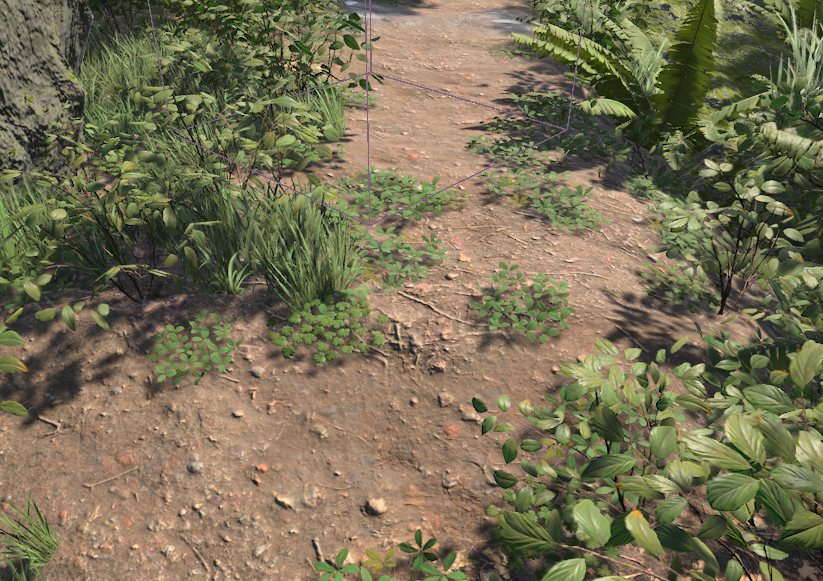
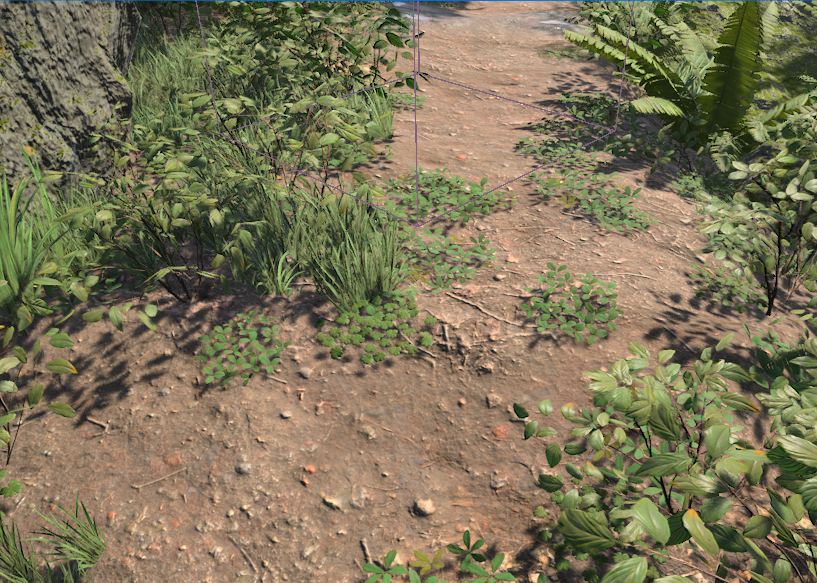
Epic Screen-Space Dither
x.LODDitherMode=0
Bayer 2×2
x.LODDitherMode=1
Bayer 4×4
x.LODDitherMode=2
Hashed Alpha Testing
Unreal Engine X introduces per-material Hashed Alpha Testing for Masked materials, replacing the fixed alpha cutoff with a hashed threshold for improved coverage of fine geometry and foliage.
Enable Hashed Alpha Test under Advanced in the Material Editor.
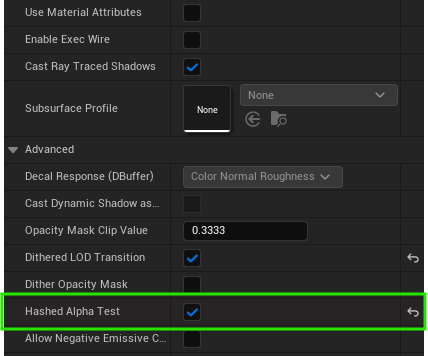
Hashed Alpha Test material setting
Global Toggle
The feature can be enabled or disabled at runtime without changing individual materials:
x.Material.HashedAlphaTesting=1
| Value | Behavior |
|---|---|
0 | Standard masked alpha clipping |
1 (default) | Hashed alpha testing on opted-in materials |
The toggle affects both the main rendering and shadow passes.
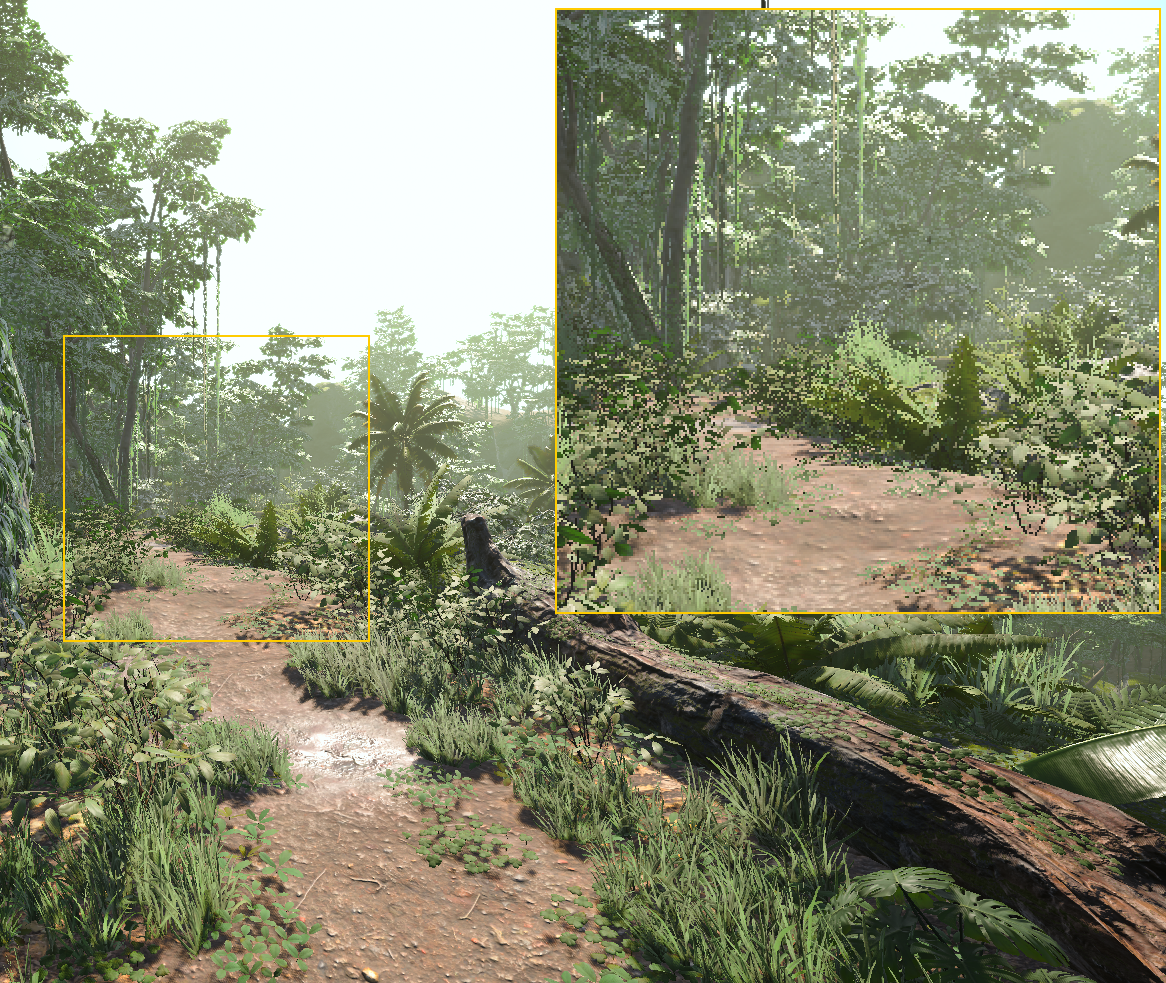
Hashed Alpha — ON
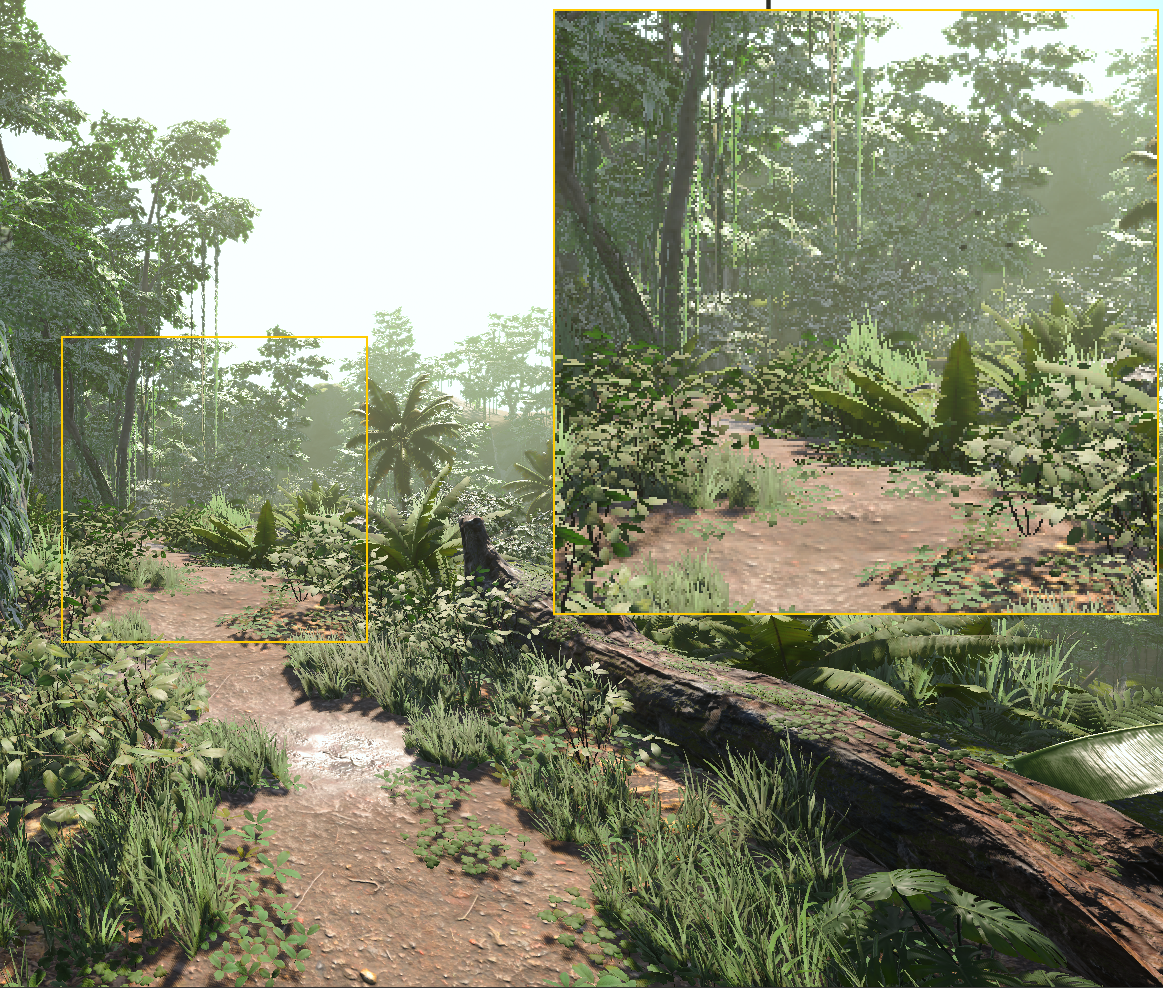
Hashed Alpha — OFF
Hashed Alpha Testing works best with temporal anti-aliasing (TAA/TSR). Spatial-only methods such as FXAA or SMAA may produce noticeable noise. Set x.Material.HashedAlphaTesting=0 when using spatial AA.
Based on Hashed Alpha Testing — NVIDIA Research (2017).
Custom Upscaler
The current temporal route requires:
r.AntiAliasingMethod=2
r.TemporalAA.Upsampling=1
r.VelocityOutputPass=1
Using:
r.AntiAliasingMethod=0
prevents Unreal Engine's temporal-accumulation check in SceneVisibility.cpp and therefore prevents the normal engine temporal jitter sequence.
The custom upscaler must be installed for every intended view family. If it is not installed, AAM_TemporalAA can fall back to Epic TAA.
The fork-specific:
x.AA.TwoSamplePattern
only changes the pattern when:
r.TemporalAASamples=2
It does not enable temporal jitter by itself.
UI
ImGui Editor UI and XDash
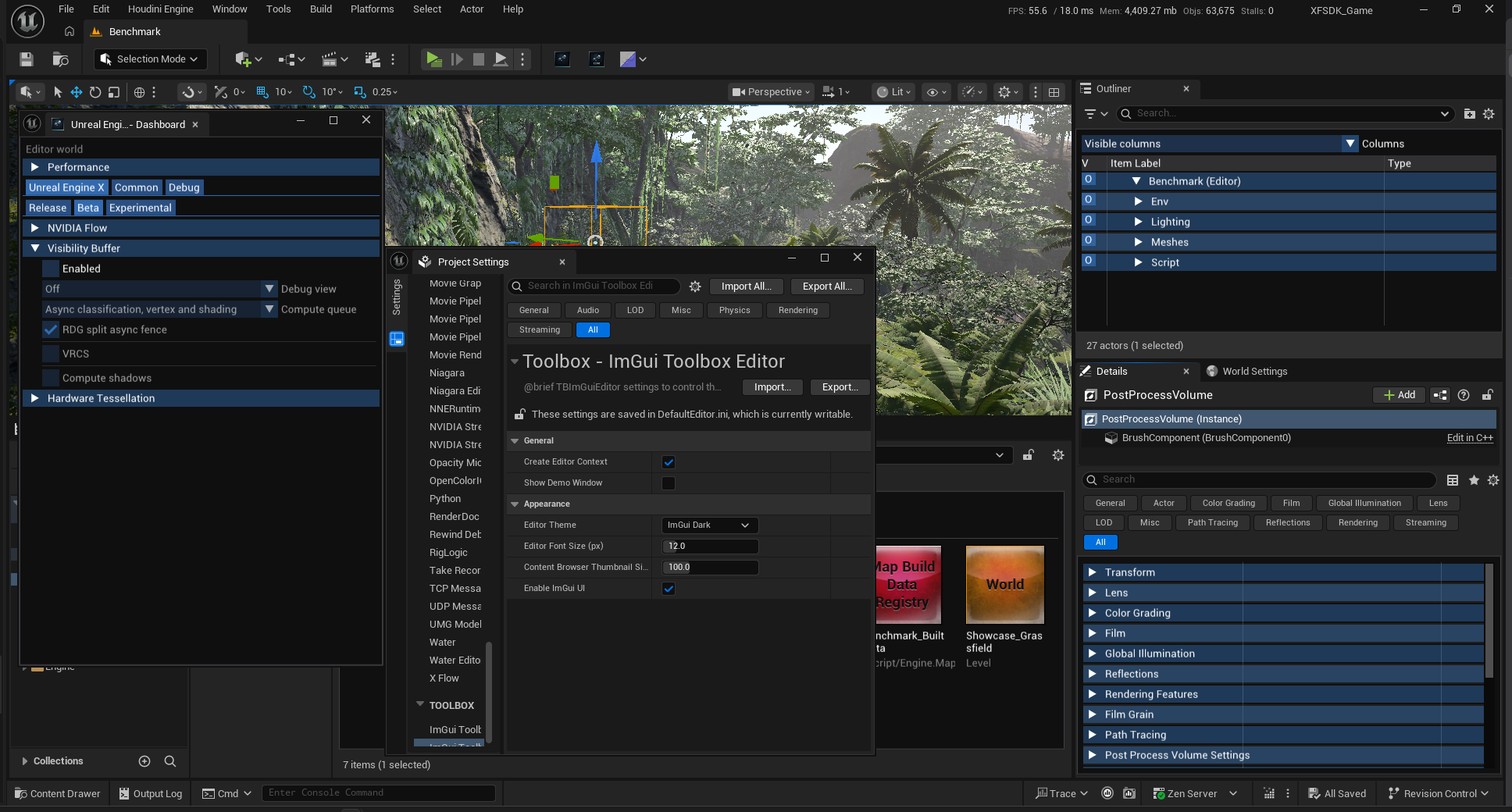
Unreal Engine X includes optional TBImGui presentation for selected editor views and an XDash dashboard as quality-of-life additions.
Enable Enable ImGui UI and restart the editor.
The interface uses compact, square controls and classic ImGui category headers. Font and thumbnail sizes are saved in Project Settings. Asset tiles support native previews, colored UE3-style placeholders, material-parent names and texture dimensions.
Unreal continues to handle editing, selection, transactions, permissions and commands. Specialized controls use native popovers where needed; editor coverage remains partial.
Open Unreal Engine X from the Level Editor toolbar or Window menu to access XDash. It groups rendering controls, experimental features, CPU/GPU histories, worker-GPU telemetry and debug visualizations.
UnrealBuildTool
Plugin Module Exclusion
DisablePluginModules lets a target skip selected modules when UnrealBuildTool
processes an enabled plugin's module list. The plugin remains enabled, and its
other eligible modules can still be built.
The backport is applied to the fork's source and has passed a UBT compilation check. Rebuild UBT before using it.
Configuration
Add the exclusions inside the constructor of the relevant .Target.cs file.
The dictionary key is the plugin name from its .uplugin filename. Each value
contains module names from that descriptor's Modules array.
For example, given MyPlugin.uplugin with these modules:
"Modules": [
    {
        "Name": "MyPluginCore",
        "Type": "Runtime",
        "LoadingPhase": "Default"
    },
    {
        "Name": "MyPluginOptionalIntegration",
        "Type": "Runtime",
        "LoadingPhase": "None"
    }
]
Exclude the optional integration in your game target:
using UnrealBuildTool;
using System.Collections.Generic;

public class MyGameTarget : TargetRules
{
    public MyGameTarget(TargetInfo Target) : base(Target)
    {
        Type = TargetType.Game;
        DefaultBuildSettings = BuildSettingsVersion.Latest;

        ExtraModuleNames.Add("MyGame");

        DisablePluginModules["MyPlugin"] = new HashSet<string>
        {
            "MyPluginOptionalIntegration",
        };
    }
}
Replace the example names with your project, plugin and module names. In an
existing target, add only the dictionary assignment and the
System.Collections.Generic import if needed.
Configuration applies to that target. Add it separately to Editor, Client or Server targets that require the same exclusions. Plugin and module matching is case-insensitive.
Conditional exclusions
An existing target can exclude an integration only for selected platforms:
if (Target.Platform == UnrealTargetPlatform.Win64)
{
    DisablePluginModules["MyPlugin"] = new HashSet<string>
    {
        "MyPluginOptionalIntegration",
    };
}
Multiple modules can be listed in the same set:
DisablePluginModules["MyPlugin"] = new HashSet<string>
{
    "MyPluginOptionalIntegration",
    "MyPluginAnalytics",
};
Dependencies and runtime loading
This setting filters the plugin's automatic module selection. It is not a global prohibition against building or loading those modules.
- Another module's public, private or dynamically loaded dependency can still cause an excluded module to be selected.
- Explicit target module requests and build-all-modules configurations can also select it.
- The setting does not rewrite the
.uplugindescriptor or its loading phases. - An automatically loaded module can still be requested at startup, causing a missing-module error if its binary was omitted.
- Code that explicitly loads an optional module must handle its absence.
The example uses LoadingPhase: None to avoid automatic startup loading.
That does not remove dependencies or prevent explicit loading.
Use this feature for integrations whose build dependencies and runtime loading are already optional. Validate a clean build and startup for each affected target, since binaries left by an earlier build can hide missing-module problems.
Third-Party
meshoptimizer LOD Reduction
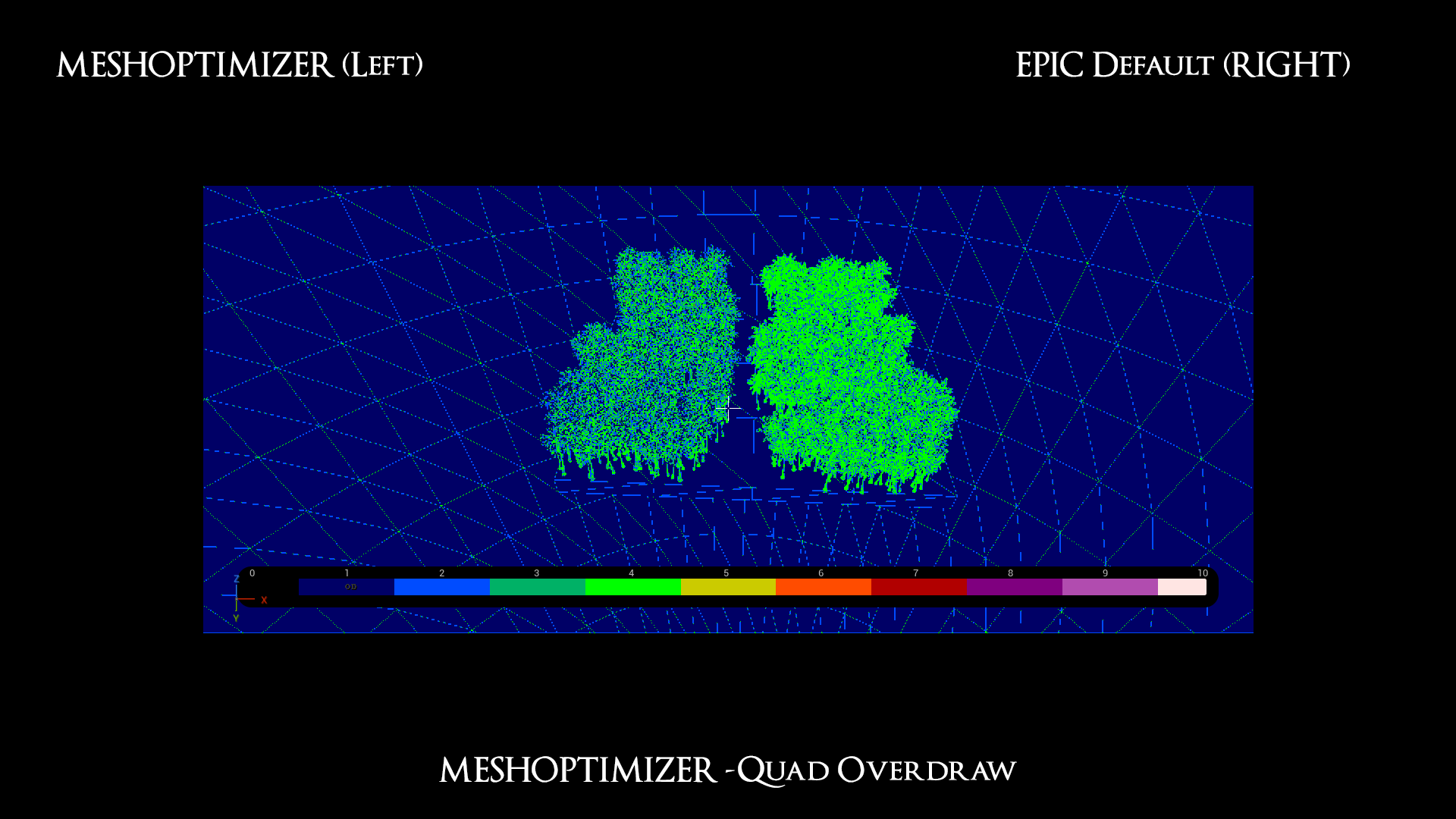
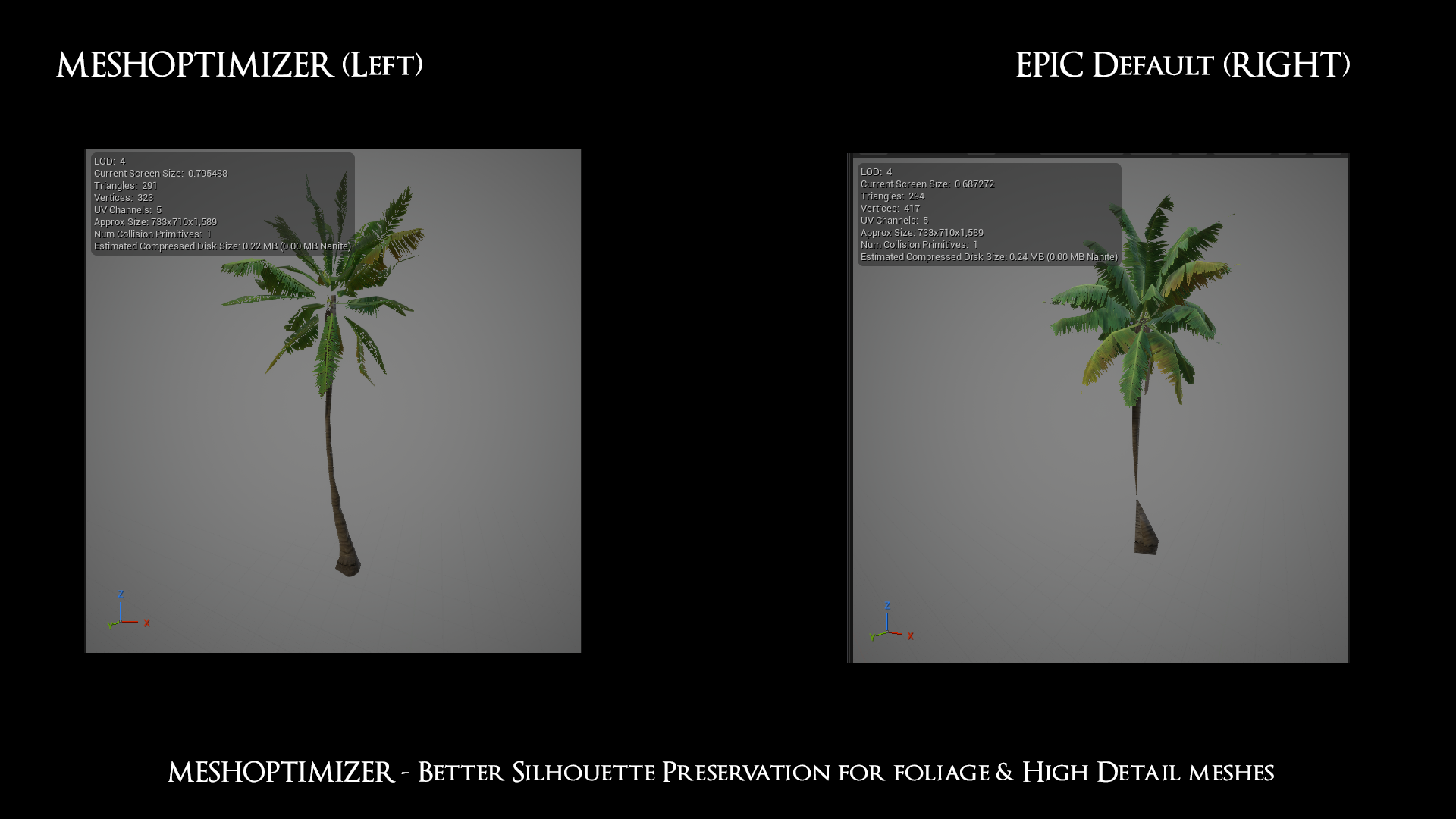
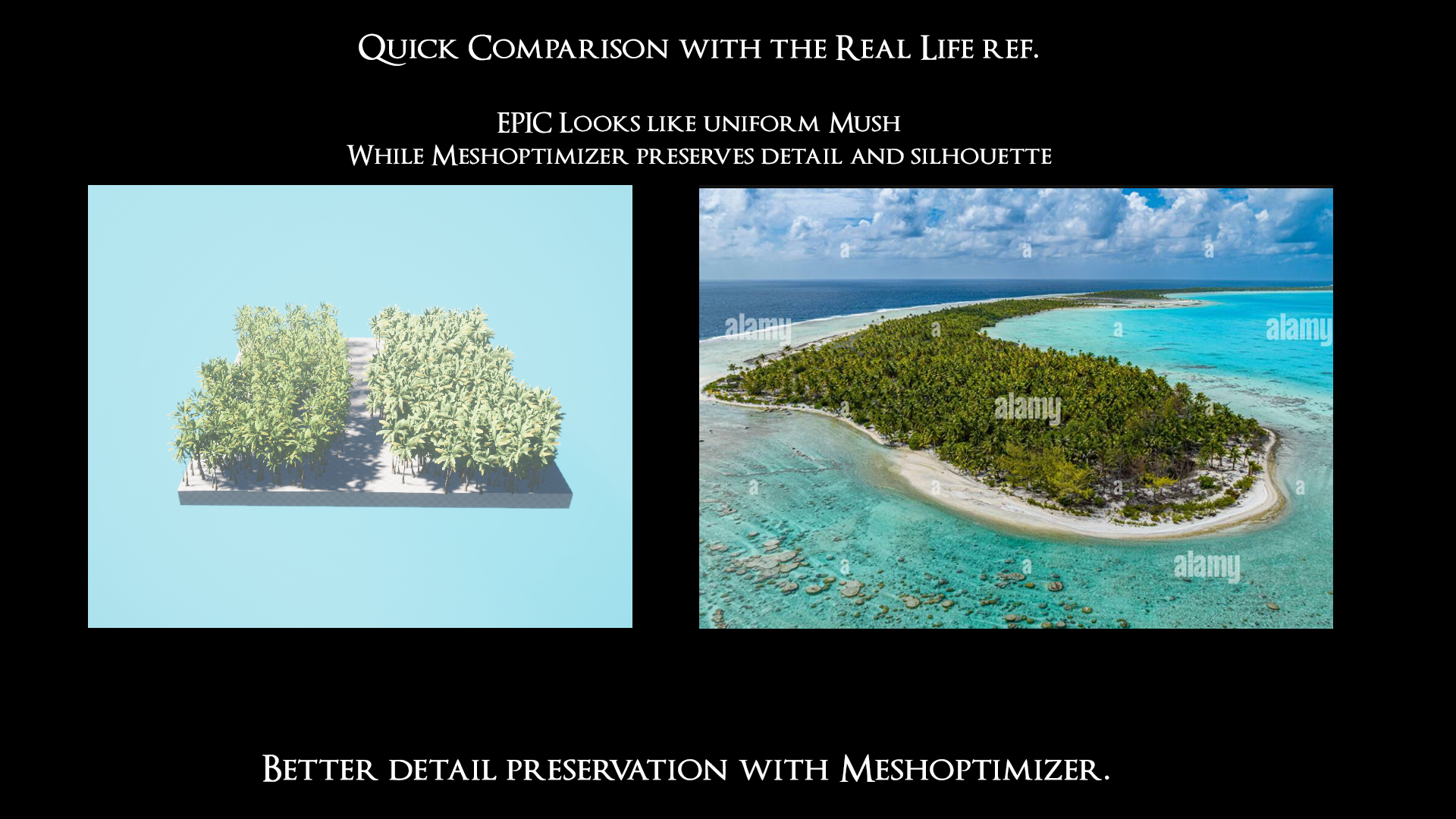
meshoptimizer is integrated into Unreal Engine X as an alternative LOD reducer.
This provides an additional mesh-simplification path outside Unreal Engine's standard reduction stack.
Related controls include:
| Console variable | Default | Description |
|---|---|---|
x.MeshOptimizer.LOD | 0 | Uses meshoptimizer for static-mesh LOD reduction |
x.MeshOptimizer.Overdraw | 0 | meshoptimizer overdraw optimization during static mesh build |
x.MeshOptimizer.CoarseLODStart | 2 | First LOD using stronger reduction with protected permissive simplification (-1 disables) |
x.MeshOptimizer.CoarseLODRatio | 0.85 | Extra triangle target multiplier per coarse LOD (0.5-1) |
x.MeshOptimizer.AutoLODProjectedError | 0 | 1 computes LOD screen sizes from a projected pixel-error approximation (1920x1080 reference) instead of UE's deviation-to-distance estimate |
Rebuild meshes after changing a reduction setting.
Examples
Recommended Project Configuration
The following configuration establishes the intended Unreal Engine X feature contract and disables UE5 systems that are outside the primary renderer target.
Several of these settings affect shader permutations or platform capabilities and should be configured before building the project's final shader set.
Renderer Settings
[/Script/Engine.RendererSettings]

r.ForwardShading=0

r.Nanite.ProjectEnabled=0
r.Nanite=0

r.Shadow.Virtual.ProjectEnabled=0
r.Shadow.Virtual.NonNanite.ProjectEnabled=0
r.Shadow.Virtual.Enable=0
r.Shadow.Classic.ProjectEnabled=1

r.Lumen.Supported=0
r.Lumen.DiffuseIndirect.Allow=0
r.Lumen.Reflections.Allow=0

r.Substrate=0

r.MegaLights.Supported=0
r.MegaLights.EnableForProject=0
r.MegaLights.Allowed=0

r.DBuffer=0

r.AnisotropicMaterials=0

r.DefaultFeature.AmbientOcclusion=0
r.AmbientOcclusionLevels=0

r.DistanceFields=0
r.GenerateMeshDistanceFields=0
r.DistanceFieldAO=0
r.DistanceFieldShadowing=0
r.HeightFieldShadowing=0

r.VirtualTextures=0

r.Water.Enabled=0
r.Water.SingleLayer=0
r.Water.SingleLayer.DepthPrepass=0
x.WaterInfo.Enabled=0

; Screen-size primitive culling
r.MinScreenBoundsRadius.Experimental=0.00075  ; 0.001 for more aggressive primitive culling
r.MinScreenBoundsSphereRadiusCutoff.Experimental=1.0
r.MinScreenBoundsIgnoreDistance.Experimental=1500
Console Variables
[ConsoleVariables]

x.MeshOptimizer.LOD=0
x.MeshOptimizer.Overdraw=0

r.Nanite=0
r.Nanite.ShowUnsupportedError=0

x.OcclusionQueries.OccludedPrimitiveQueryBatchSize=64 ;configurable occlusion-query batching.
Several of these settings control project support, shader-platform capabilities, or shader permutations.
After changing them:
- restart the editor,
- rebuild affected shaders where required,
- regenerate derived data when necessary.
Changing only a runtime CVar may not be sufficient.
Research
CSM Improvements
Further shadow work builds on the classic cascaded shadow path described in Cascaded Shadow Maps.
Restoring a Stripped Feature
Unreal Engine X can disable features at more than one level. Restoring a feature may therefore require more than changing a runtime CVar.
To restore a stripped feature:
- Restore the commented Epic implementation at every relevant hard source gate.
- Remove or relax the corresponding cached mesh-pass exclusion.
- Restore the feature's project-support CVar before compiling shaders.
- Restart the editor and rebuild the affected shaders and derived data.
Restoring only a runtime CVar is insufficient when a feature has also been disabled through:
- a source-level return,
- a platform-support CVar,
- a shader-permutation setting,
- a platform capability query,
- or a cached mesh-pass mask.
Restore the source gate and project configuration together.