System
This page covers the two utility modules that handle engine startup and level transition feedback: uEx Shader Precompilation and the Loading Screen System.
uEx Shader Precompilation
Overview
The Shader Precompilation plugin eliminates shader compilation stutter during gameplay by forcing all project materials through the GPU's shader pipeline at startup, before the player reaches any interactive content. It works by spawning a scene with multiple meshes, asynchronously loading every material and material instance registered in the Asset Registry, applying each one to the meshes — which forces Unreal's shader compiler to build and cache the corresponding PSOs. Once all shaders have compiled, the plugin automatically transitions to the real game level.
The system is designed to be fire-and-forget. On first launch it runs the full prewarming pass, saves a completion marker to the save game system, and on subsequent launches skips straight to the game level. A customisable UMG widget provides visual feedback (progress bar, material count) during the process.
Quick Start
- Go to Project Settings → Game → uEx Shader Precompilation.
- Set the loading widget to:
/uexFramework/uexRHI/ui/w_shader_compile.w_shader_compile - Set the level to transition to after precompilation (e.g. your
MainMenumap).
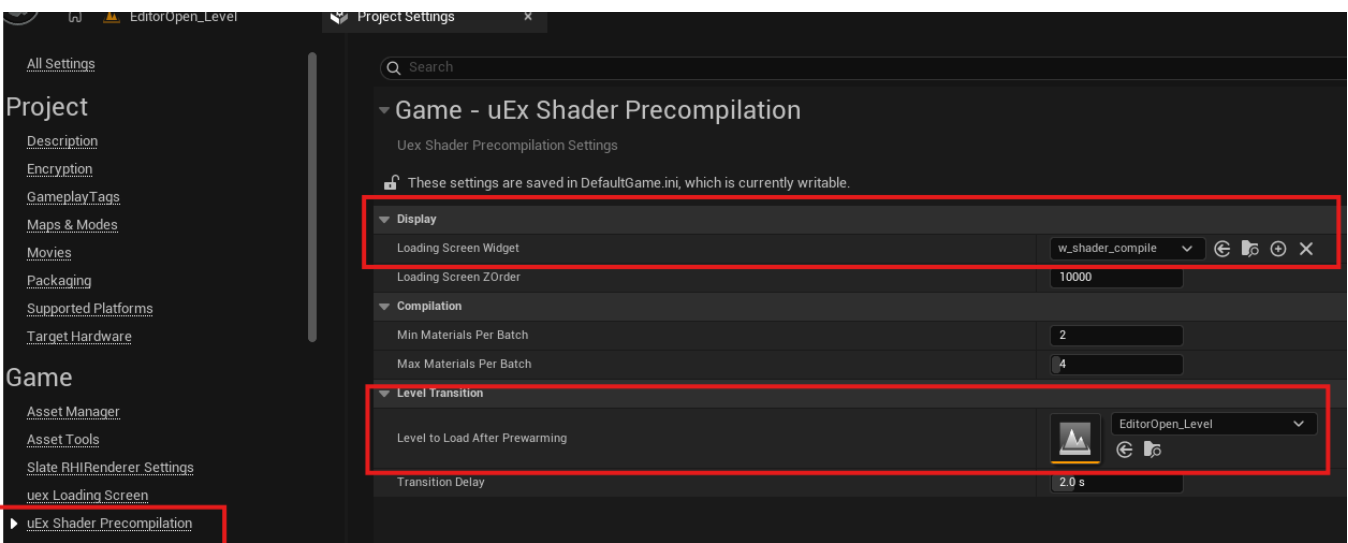
Plugin Settings
Display
LoadingScreenWidget (soft class path, default: none)
The UMG widget class to display during shader compilation. Must derive from UuexShaderCompilationWidget. The widget receives a reference to the compilation actor and can call GetCurrentMaterialIndex(), GetTotalMaterialCount(), and GetLoadedMaterialsCount() to drive progress UI. If left empty, compilation still runs but with no visual feedback.
LoadingScreenZOrder (int, default: 10000)
The z-order of the compilation widget in the viewport stack. The high default ensures it renders above any other HUD elements that might exist in the prewarming level.
Compilation
MinMaterialsPerBatch (int, default: 2, range: 1–32)
Minimum number of materials to load per batch. The actual batch size is computed at runtime from CPU core count, but will never go below this floor.
MaxMaterialsPerBatch (int, default: 4, range: 1–32)
Maximum number of materials per batch, and also the number of mesh compiler slots created at startup. Each slot allocates four mesh components — keep this reasonable on memory-constrained platforms. The runtime batch size will not exceed this value.
Level Transition
LevelToLoad (soft object path to UWorld, default: none)
The level to open after shader compilation completes (or immediately on re-launch if already done). If left empty, the actor logs a warning and does nothing after compilation finishes.
TransitionDelay (float, default: 2.0, range: 0.0–10.0 seconds)
How long to wait after the last shader finishes compiling before opening the target level. Gives the UI a moment to show a "complete" state and prevents the transition from feeling abrupt.
Blueprint API
The compilation actor exposes the following for use by the loading widget or other Blueprint logic.
| Function | Type | Description |
|---|---|---|
GetCurrentMaterialIndex() | BlueprintPure → int32 | Index of the next material to be queued. Climbs from 0 toward the total count during compilation. |
GetTotalMaterialCount() | BlueprintPure → int32 | Total number of materials and material instances discovered in the project. |
GetLoadedMaterialsCount() | BlueprintPure → int32 | How many materials have finished loading and been applied to meshes. Use GetLoadedMaterialsCount() / GetTotalMaterialCount() to drive a progress bar. |
CompilationEnded() | BlueprintCallable | Triggers the transition sequence early (e.g. from a "Skip" button). Only transitions once the shader queue is empty. |
OnMaterialLoaded | BlueprintAssignable delegate | Fires every time a material finishes loading. Bind to this to update the display each time the loaded count changes. |
Library Functions
UuexShaderPrecompilationLibrary is a static Blueprint function library available from any Blueprint or C++ context.
| Function | Description |
|---|---|
GetAllMaterials() | Returns soft references to every UMaterial in the Asset Registry. |
GetAllMaterialInstances() | Returns soft references to every UMaterialInstance in the Asset Registry. |
AreShadersCompiling() | Returns true if GShaderCompilingManager reports any pending or remaining shader compilation jobs. Safe to call even if the manager is null. |
GetNumShadersRemaining() | Returns the combined count of pending + remaining shader jobs. Useful for a secondary progress indicator. |
GetNumPSOsRemaining() | Returns the number of PSO precompiles still queued in the shader pipeline cache. This is a separate system from shader compilation and may continue running after material shaders are done. |
GetOptimalBatchSize() | Computes a batch size based on CPU core count (2× hyperthreaded cores, clamped to 4–32). Used internally but exposed for debugging or custom flows. |
Loading Screen System
Overview
The loading screen system manages visual feedback during engine startup, level transitions, and gameplay loading. It is split across two modules that together cover the full boot lifecycle.
uexStartupLoadingScreen (ClientOnly, PreLoadingScreen phase)
A minimal Slate-only module that displays a black screen during early engine initialization, before the Game Instance, UObject subsystems, or any game assets exist. It registers a FPreLoadScreenBase implementation with the engine's FPreLoadScreenManager so the player sees a clean black frame instead of a frozen window while core systems load. Once the engine finishes its pre-load phase the manager cleans up automatically.
uexLoadingScreen (Runtime, Default phase)
A UGameInstanceSubsystem (UuexLoadingScreenManager) that manages a UMG loading screen widget during level loads and gameplay transitions. It ticks every frame and evaluates a priority-ordered checklist to decide whether the loading screen should be visible:
- Force-show CVar override
- Shader precompilation screen active (suppresses this loading screen)
- Null world context or world
- GameState not yet replicated
- Currently inside a
LoadMapcall - Pending travel URL or pending net game
- World has not begun play
- Seamless travel in progress
- GameState or its components implementing
IuexLoadingProcessInterface - PlayerController or its components implementing
IuexLoadingProcessInterface - Externally registered
UuexLoadingProcessTaskobjects - Missing local player controllers (splitscreen-aware)
- PSO precaching still in progress
When the loading screen is shown, the system blocks all player input via a Slate input preprocessor, disables world rendering, switches the PSO cache to fast-batch mode, suspends the hitch heartbeat detector, and enables high-priority level streaming. When hidden, all of these are reversed and a forced garbage collection runs to free load-time memory.
Quick Start
- Go to Project Settings → Game → uex Loading Screen.
- Set the loading widget to:
/uexFramework/uexLoadingScreen/w_loading.w_loading
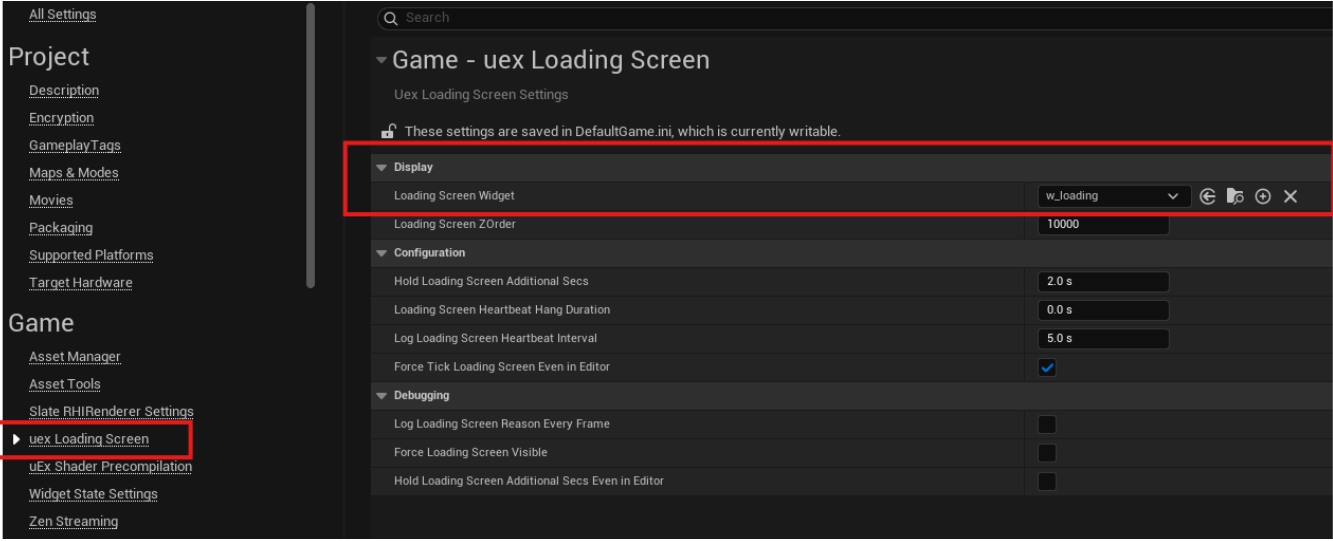
Settings
LoadingScreenWidget (soft class path, default: none)
The UMG widget class to display. Must be a UUserWidget. If the class fails to load, a fallback SThrobber is shown and an error is logged.
LoadingScreenZOrder (int, default: 10000)
Z-order in the viewport stack.
HoldLoadingScreenAdditionalSecs (float, default: 2.0 seconds)
How long to keep the loading screen visible after all loading conditions have cleared, to give texture streaming time to reach full resolution. During this hold period world rendering is re-enabled so textures actually stream in. Set to 0 for instant dismissal.
LoadingScreenHeartbeatHangDuration (float, default: 0.0 seconds)
If non-zero, arms the engine's hang detector while the loading screen is visible. If the loading screen stays up longer than this without being dismissed, the hang detector fires. Useful for catching infinite-load bugs in development.
LogLoadingScreenHeartbeatInterval (float, default: 5.0 seconds)
How often to log the current reason the loading screen is still visible. Set to 0 to disable. Useful for diagnosing what is holding the screen up.
LogLoadingScreenReasonEveryFrame (bool, default: false, CVar: CommonLoadingScreen.LogLoadingScreenReasonEveryFrame)
Prints the show/hide reason to the log every single frame. Extremely verbose — use only for active debugging.
ForceLoadingScreenVisible (bool, default: false, CVar: CommonLoadingScreen.AlwaysShow)
Forces the loading screen to stay visible regardless of actual loading state. Useful for iterating on widget appearance.
HoldLoadingScreenAdditionalSecsEvenInEditor (bool, default: false)
When true, the hold delay is applied even in PIE.
ForceTickLoadingScreenEvenInEditor (bool, default: true)
When true, Slate is force-ticked immediately after showing the loading screen so the widget appears on the very first frame in PIE.
Console Variables
| CVar | Default | Description |
|---|---|---|
CommonLoadingScreen.HoldLoadingScreenAdditionalSecs | 2.0 | Runtime mirror of the hold setting. Adjustable at runtime for debugging. |
CommonLoadingScreen.LogLoadingScreenReasonEveryFrame | false | Per-frame reason logging. |
CommonLoadingScreen.AlwaysShow | false | Forces the loading screen visible at all times. |
In non-shipping builds, the -NoLoadingScreen command-line argument disables the loading screen entirely.
Blueprint API
UuexLoadingScreenManager
Accessible from any Blueprint via GetGameInstance → GetSubsystem → UuexLoadingScreenManager.
| Function | Type | Description |
|---|---|---|
GetDebugReasonForShowingOrHidingLoadingScreen() | BlueprintCallable → FString | Human-readable reason why the loading screen is currently shown or hidden. Updated every frame. |
GetLoadingScreenDisplayStatus() | Returns bool | True if the loading screen is currently visible. |
SetShaderPrecompilationScreenActive(bool) | BlueprintCallable | Tells the manager that the shader precompilation screen is active. While active, the manager suppresses its own loading screen to avoid overlap. |
IsShaderPrecompilationScreenActive() | BlueprintPure → bool | Returns whether the shader precompilation screen is currently suppressing the loading screen. |
RegisterLoadingProcessor(TScriptInterface) | BlueprintCallable | Registers an external object implementing IuexLoadingProcessInterface. The manager polls it every frame until unregistered. |
UnregisterLoadingProcessor(TScriptInterface) | BlueprintCallable | Removes a previously registered loading processor. |
OnLoadingScreenVisibilityChangedDelegate | Multicast delegate (bool bIsVisible) | Fires when the loading screen is shown or hidden. Bind to this for music changes, analytics, or other systems that need to react to loading state. |
UuexLoadingProcessTask
A lightweight UObject wrapper for keeping the loading screen up from Blueprint.
| Function | Description |
|---|---|
CreateLoadingScreenProcessTask(WorldContextObject, ShowLoadingScreenReason) | Creates a new task, registers it with the manager, and returns it. The loading screen stays up as long as this task is registered. |
SetShowLoadingScreenReason(InReason) | Updates the debug reason string shown in logs. |
Unregister() | Unregisters the task, allowing the loading screen to dismiss (if no other conditions are keeping it up). Must be called explicitly. |
IuexLoadingProcessInterface
Implement on any UObject (GameState, PlayerController, components, or custom actors) to keep the loading screen visible. Return true from ShouldShowLoadingScreen(OutReason) with a non-empty reason string. The manager polls GameState, PlayerControllers, and their components automatically; other objects must be registered via RegisterLoadingProcessor.